The public store tab you explicitly choose, public product pages and the product evidence required to build the scan.

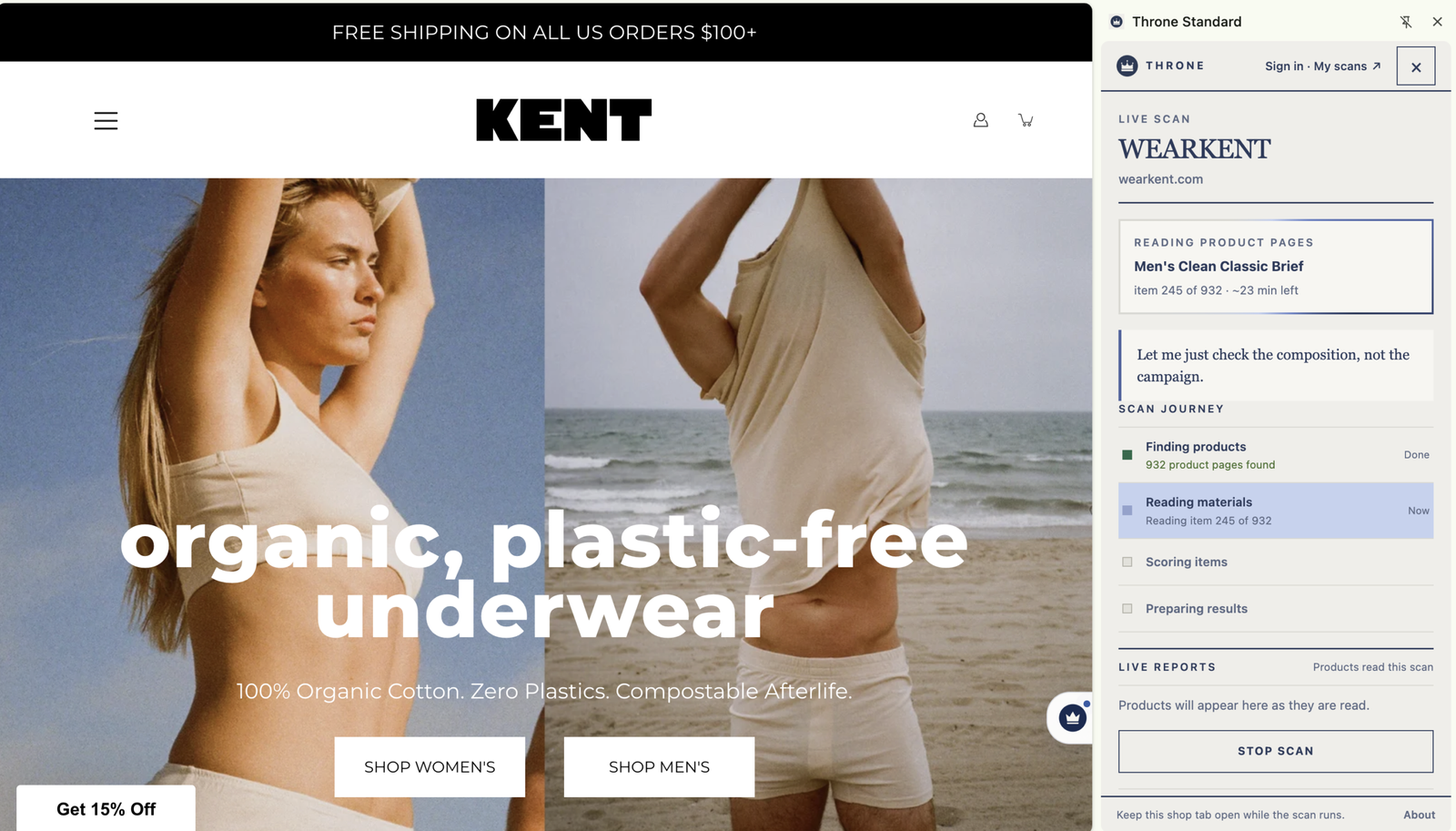
Open the extension while browsing a brand website to inspect available catalogue and composition evidence. Open each HTT report to check assessment status, coverage and limitations.
A side panel that reads a brand's own published catalogue and reports composition transparency, with per-SKU evidence and unscored items shown separately, and a result you can copy or download as CSV.
Original uploaded Chrome screenshots.


Open the throne mark on a known brand and its current Hold The Throne result appears immediately, without making the shopper scan again.
When no saved result exists, the scanner detects the brand category and applies the shared category policy with thirteen branches for products, places and experiences.
See the score-colour result card, the plain sentence behind the number, per-SKU evidence, then open the matching Hold The Throne report.
Copy the verdict in one tap, download every scanned SKU as CSV, or open the brand's Hold The Throne page.
Click the throne mark on a supported store.
Approved scan ≤ 7 days to load instantly
Otherwise to scan the public catalogue
Choose Sign in or My scans inside the Chrome sidebar. Your current result remains in the extension while a secure website tab opens. Sign in or create a free Hold The Throne account; the sidebar detects completion, resumes the action and saves future result views to Your scans.
If you already have an account, sign in. If you start on this website, create the free account now, then return to the installed tool and choose Connect account once.
A short-lived signed request identifies only this installation. Authentication completes on Hold The Throne and the Chrome sidebar confirms the connection automatically.
Scan dates, every SKU checked, filters, gaps and approved results stay in the private account. Only approved evidence is published.
Open the brand website and open Throne Scanner. A published Hold The Throne result loads instantly when available. Otherwise scan the public catalogue: the extension detects the department, reads product and variant evidence, and clearly separates scanned, filtered, scored and unresolved SKUs. Every count opens the products behind it, the result can be copied or downloaded as CSV.
Existing approved results and their complete SKU evidence are free. If no usable result exists, start a Community Scan. One active scan runs at a time, opening results never starts another scan, and duplicate requests attach to the same work.
Scanner access is included with a verified HTT account. Active premium members have no successful-record allowance cap. Empty results, repeats and enrichment add no units; membership never changes the scoring rules.
Open Sign in or My scans in the Chrome sidebar. Sign in or register in the secure Hold The Throne tab. The pending action stays in the extension, activation is detected automatically and future results can sync to Your scans.
No. Every discovered SKU is retained, but gift cards, unrelated product types and products without usable evidence are visibly filtered from the relevant score.
The included scanner uses the same account allowance for large and small catalogues. Technical limits can defer work. A partial result retains its exact coverage; only a reconciled census is complete, and draft publication gates still apply.
The current usable approved result loads immediately. If no complete result exists, start a Community Scan. The previous successful result remains authoritative until a newer usable result is approved.
Open the extension while browsing a brand website to inspect available catalogue and composition evidence. The published listing describes product-level results, comparison of saved brands and export of scan data.
Public version 0.7.6 · Chrome Web Store listing updated 28 September 2026; checked 1 October 2026.
Material composition, catalogue coverage and a brand’s wider ethical performance answer different questions. Check which question a result can support.
Open a supported store, then launch Throne. A current approved result loads immediately when available; otherwise the extension offers a scan. New assessments use Standard 2.2.0 draft. Every category pack keeps publication held until its evidence, reference and calibration checks pass.
See the Gymshark flowIt reads the public shop page you explicitly choose to scan and the public product evidence needed for the result.
It does not read passwords, private messages, payment details, unrelated tabs or browsing history to calculate a store result.
One Throne Scan · category branches
Throne Scan captures the exact product, place or experience. Results show the category, source date, SKU or recorded identity, declarations or ingredients, price, evidence gaps and the assessment status. Missing values remain unknown.
Current default: 2.2.0-draft. Draft packs retain evidence while their reference, calibration, anchors or independent verification remain pending. A captured record is not automatically a published score.
| Category | Named metric | Release status |
|---|---|---|
| Textiles | Mean declared plant-fibre percentage | READY |
| Beauty and body care | Complete INCI purity preference pass rate | EXPERIMENTAL |
| Food and supplements | Complete ingredient processing-marker preference pass rate | EXPERIMENTAL |
| Pet food | Named, additive-free, species-appropriate declaration pass rate | EXPERIMENTAL |
| Home formulations | Complete plant/mineral ingredient and listed-hazard preference pass rate | EXPERIMENTAL |
| Home and toy articles | Materials, hazard and product-evidence score | EXPERIMENTAL |
| Absorbent and tissue hygiene | Fibre state, process, additives and product-evidence score | EXPERIMENTAL |
| Devices and technology | Repairability and device-evidence score | EXPERIMENTAL |
| Ethics | Labour, traceability and remedy evidence score | EXPERIMENTAL |
| Jewellery | Sourcing and jewellery-evidence score | EXPERIMENTAL |
| Cocoa supply chain | Cocoa supply-chain evidence score | EXPERIMENTAL |
| Accommodation | Venue environmental evidence score | EXPERIMENTAL |
| Tours | Nature and tour environmental evidence score | EXPERIMENTAL |
Origin classes are plant, animal, mineral, regenerated, synthetic and unknown. Origin is a recorded fact or stated preference; it does not establish safety, health or overall sustainability. Mixed brands receive separate category results, with ethics and cocoa evidence kept as separate layers.
Each parent product contributes once. Sizes do not add votes. A partial assessment shows assessed and unresolved counts, disclosure rate and a possible range. A headline requires the policy’s coverage and publication checks; unresolved products are not scored as failures. Full means a reconciled census, rather than a crawl that happened to finish.
Included with HTT membership. A success unit is a new useful evidence-backed product, place or experience. Empty captures, failed requests, repeats, retries and enrichment of an existing identity do not consume another success unit. Price alone or a URL without useful evidence does not count as success.
Updated Chrome, Wix, Shopify, website, MIW and cloud clients use the shared scanner policy. Install the current client release to obtain the category interface; it checks subsequent policy updates automatically. Earlier records keep their original dates and versions until a verified reassessment is released.
The hero is deliberately rectangular so the result UI is readable rather than cropped into a tall mockup.
| Feature | Free | Member |
|---|---|---|
| Install extension | Included | Included |
| Open available public results | Included | Included |
| Start supported Community Scan | Included | Included |
| Saved research / higher account limits | Basic | Expanded |
| Membership changes the score | No | No |
The public shop tab and public product/catalogue evidence you explicitly choose to scan.
Private messages, passwords, payment details or unrelated browsing history are not needed to score a public catalogue.
When HTT already has an approved result, the extension loads it before offering a new scan. If no current result exists, it clearly asks for a scan rather than inventing a rating.